
ACFT Calculator Online Tool Description
It can be hard to keep track of your ACFT performance, especially since each event has its own way of scoring and standards. Most people don’t want to sit down and figure out their scores by hand after finishing a full workout or test. And to be honest, not everyone really understands how the scoring system works.
That's when this tool comes in handy. The ACFT Calculator from Fileion is meant to make things easier. You don't have to worry about math anymore, just enter your performance and see your total score right away. It makes things easier and shows you exactly where you are.
It can be hard to keep track of your ACFT performance, but this tool makes it much easier. It helps you save time and effort, whether you are preparing for the test or simply checking your current fitness level.
How You Actually Use It
The best part is that you don't need to know anything special to use it.
On the screen, you will see a few simple input fields. Each one stands for a different ACFT event. The calculator will take care of everything else in the background as long as you put your results in the right places.
Step-by-Step
Step 1: Enter Your Basic Info
You’ll usually need to input:
-
Gender
-
Age group
Step 2 : Input Your Scores for Each Event
There are 6 ACFT events. Enter your performance for all 6 ACFT events. The 6 ACFT events are,
-
Deadlift (MDL)
-
Standing Power Throw (SPT)
-
Hand-Release Push-Ups (HRP)
-
Sprint-Drag-Carry (SDC)
-
Plank (PLK)
-
2-Mile Run (2MR)
Deadlift
Begin with the deadlift part. In this box, you need to type in the most weight you could lift. Don't think too much about it; just type the number.
For example, if your best lift was 140 kg, just type in 140.
This part has a big effect on your overall score, so make sure you're entering the right value.
Standing Power Throw
The next event is the standing power throw. This is where you type in how far you threw the ball. This is usually measured in meters.
If your throw went 8.5 meters, for example, just type in 8.5.
Try to be as accurate as possible because even small differences can change your score.
Hand-Release Push-ups
Now move on to push-ups. You’ll need to input the total number of reps you completed with proper form.
For example, if you did 35 push-ups, just type 35.
Avoid guessing here, use your actual count to keep things accurate.
Sprint-Drag-Carry
This part is time-based. Enter the total time it took you to complete the sprint-drag-carry event. It’s usually recorded in minutes and seconds.
For example, if your time was 2 minutes 10 seconds, enter it exactly like that.
Make sure to double-check your time before moving ahead.
Plank
Next is the plank section. All you have to do here is enter how long you held the plank position.
If you lasted 1 minute 30 seconds, simply input that time.
It may seem like a smaller component, but it still contributes to your final score.
2-Mile Run
Finally, enter your 2-mile run time. This should also be in minutes and seconds.
For example, if you completed it in 16 minutes 20 seconds, just type that in.
This section plays a key role as it reflects your endurance.
Next Step
You are almost done once everything is filled out. Click the "Calculate" button and wait a moment. The tool will show you your results in a few seconds. You'll see your total score and, in most cases, a breakdown of each event as well. This helps you see not only how well you're doing overall, but also what you're good at and what you need to work on.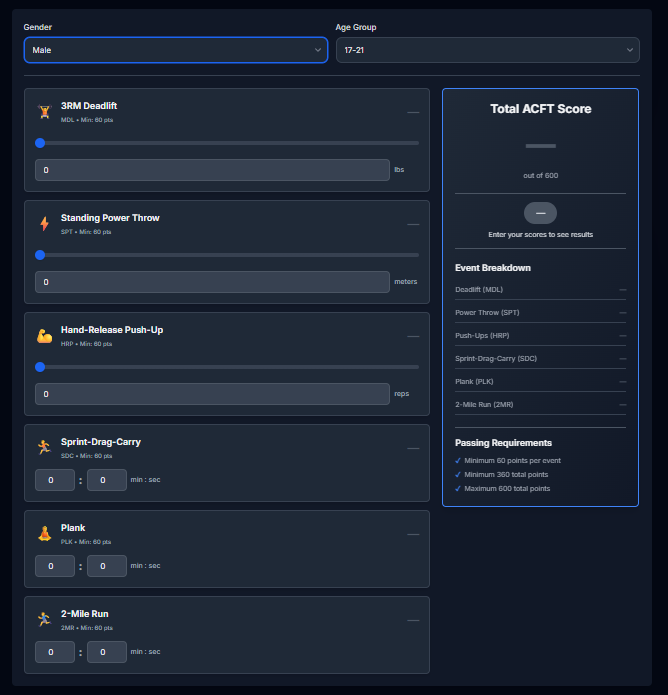
Why People Find It Useful
No need to do the math by hand
You don't have to memorize any rules or formulas for scoring. The tool does everything for you.
Time saver
You get your answer almost right away instead of having to spend a lot of time figuring everything out.
Simple to understand
The results are shown in a way that makes it easy for even beginners to understand their score.
Useful for keeping track of progress
You can use this tool over and over again to see how you're getting better over time if you train regularly.
A Quick Tip
As soon as you are done with your workout or test, try to enter your results. This way, your information stays correct, and you get a better picture of how well you're doing.
Also, don't try to guess numbers. Even little mistakes can change your final score a little bit.
-p6UL3AcG.jpg?w=70&s=b80e074110e7733cc90ee7e21579c02e)
-p6UL3AcG.jpg?q=100&w=70&s=e1e40ff373cde0719d253e4c908ba38b)